On this page
How the widget knows which agency it belongs to#
You never tell the widget which agency to use. The public key belongs to one integration, and one integration belongs to one agency on Recent Visits. The server works out the agency from the key and never trusts an agency id sent by the browser; the widget has no such option.
- The key identifies your integration; it is not a secret and does not authorise anything by itself.
- The page's address (its
Origin) must match the domain you registered; otherwise the widget cannot start and no response can be read. - After that, every request uses a short-lived session token (30 minutes idle, renewed automatically, at most 12 hours in total), and the server re-checks it each time (integration active, domain still registered, feature still on).
So the same widget code on another agency's site, with another key, shows that other agency's data. And a page on an unregistered domain gets nothing.
What data the assistant uses#
The assistant answers only from your agency's data on Recent Visits: your profile, your published tours, your Knowledge documents, your Saved answers and your published reviews. It does not use Recent Visits' general editorial content and never mentions other agencies. Retrieval is scoped to your agency inside the database query. See Conversations, knowledge and saved answers and Security and privacy.
If your data does not cover a question, the assistant says so and points to the quote form or to asking you.
Environments and drafts#
You have up to two environments, each with its own key and one registered domain (any subdomain is covered):
| Production | Test | |
|---|---|---|
| Domain | your live domain | a staging domain or localhost |
| Shows | the published settings | your saved draft (or the published settings if there is no draft) |
| Visitors' chats | reach your portal and Leads | are not delivered; deleted after 7 days |
| Quote requests | become leads | are validated, then dropped |
| Talk to the agency | if you turned it on | never |
| Message budget | standard | smaller |
Every field of the Studio is explained in the Widget Studio field reference. Only owners can change settings or websites; managers see the registered domains, snippets and keys read-only.
Workflow in the Widget Studio:
- Change the look or behaviour.
- Save draft: your Test site shows it within about a minute; production does not change.
- Check your test site.
- Publish: production shows it within about a minute and the draft is cleared. (Discard draft returns Test to the published settings.)
Settings are shared by both environments; registering or changing a domain, switching an environment off or on, and revoking a key take effect at once and need no publishing. Switch off pauses an environment; Revoke this key is permanent (register again for a new key).
A "Test mode" bar appears in the widget on the Test environment, and a quote request there says "Test mode: nothing was sent." Test requests still count against the quote limits, so sending the same email address for the same tour twice in a day is refused as a duplicate even on Test.
Featured and custom tour plans#
The widget shows your published tours, with the tours that best fit the visitor's question surfaced in the chat. There is no option in the widget to pin a particular tour or to define a custom list of recommended plans: what is shown comes from your published tours in the portal. To change what the widget offers, publish, edit or unpublish tours under Work → Tours. On a page about one tour you can pass pageContext.tourSlug to tailor suggestions to that tour (the server only accepts your own published tours).
How quote requests reach your portal#
- A visitor opens the Quote tab (or chooses Request quote on a tour), fills in the form and ticks the consent checkbox ("I agree to share these details with <your agency>").
- The request is created for your agency (taken from the integration, not from the page) and appears in Work → Leads with the source widget, linked to the conversation if there was one.
- You send a quote from the portal. The visitor gets an email and reads it on Recent Visits.
- Your view of their email and phone stays hidden until they accept a quote, as for all quote requests. See Quote requests and leads.
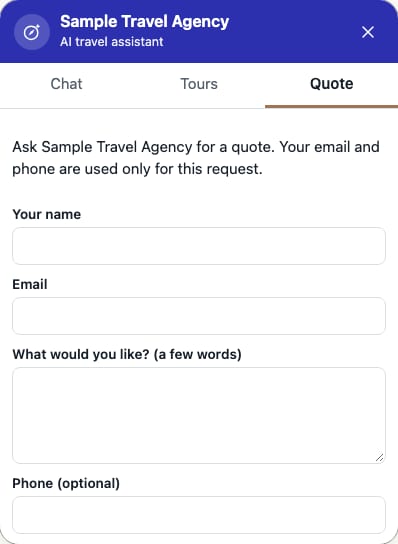
The quote form is the only place the widget asks for an email address or phone number. The chat itself never asks, and removes one if a visitor types it.
Go-live checklist#
- Your agency is Active in the portal and your tours are published.
- The Overview tab of the Studio shows both checklist items for the production website as done.
- You added Knowledge (policies, what is included, how payment works) and Saved answers for the common questions.
- You registered the Production domain (the domain you serve the site on, with or without
www). - You published your Widget Studio settings.
- You pasted the Production snippet (not the Test one) and it uses your Production key.
- If you have a Content-Security-Policy, you allowed the widget (Security).
- You opened your live site on a phone and a desktop, opened the chat, asked a question and sent a test quote request (then closed the lead in the portal).
- The privacy notice on your site mentions the chat if your policy requires it (Security).
Verify production behaviour#
Open your live site, choose the launcher and ask "what tours do you offer?". You should see your tours and your agency name in the header, no Test mode bar, and the look you published. In the portal, send yourself a request and check it arrives in Leads with source widget. Use your Test site for experiments so you never create real leads by accident.
Last checked against the product:
Related articles
- Widget Studio field reference · Every screen, tab, field and button of the Website widget page in the agency portal: websites and keys, settings, draft and publish, live preview, and what owners and managers can see.
- SDK installation · Install the Recent Visits widget with a script tag, add Subresource Integrity, run it locally, and understand the current npm status.
- SDK security and privacy · What is public and what is secret, how sessions and the domain check protect your agency, Content-Security-Policy settings, what data the widget sends and keeps, and visitor disclosure.
- Quote requests and leads · How travellers' quote requests reach you, every control on the Leads list and the request page, how to send a quote and messages, what each status means and when you see the traveller's email and phone number.
Still stuck? Contact us and tell us what you tried.