On this page
The Dashboard and Insights → Analytics (/partner/analytics) show how travellers find and respond to your tours. Both let you choose 7, 30 or 90 days (default 30) and show the change against the previous period of the same length.
Who can open it and how#
Every owner and manager. Choose Analytics under Insights in the sidebar, or Full analytics → on the dashboard. The page heading has a Help with this page link.
Controls#
| Control | Type | Explanation |
|---|---|---|
| 7 days / 30 days / 90 days | Link group | Switches the page to the last 7, 30 or 90 days. The page reloads (?days=); any other value shows 30 days. The current choice is highlighted. |
| Change label, "vs previous N days" | Text | Under each card: an up or down percentage compared with the period before. |
The cards#
The Analytics page has eight cards in a grid (the dashboard shows a selection, see The agency dashboard).
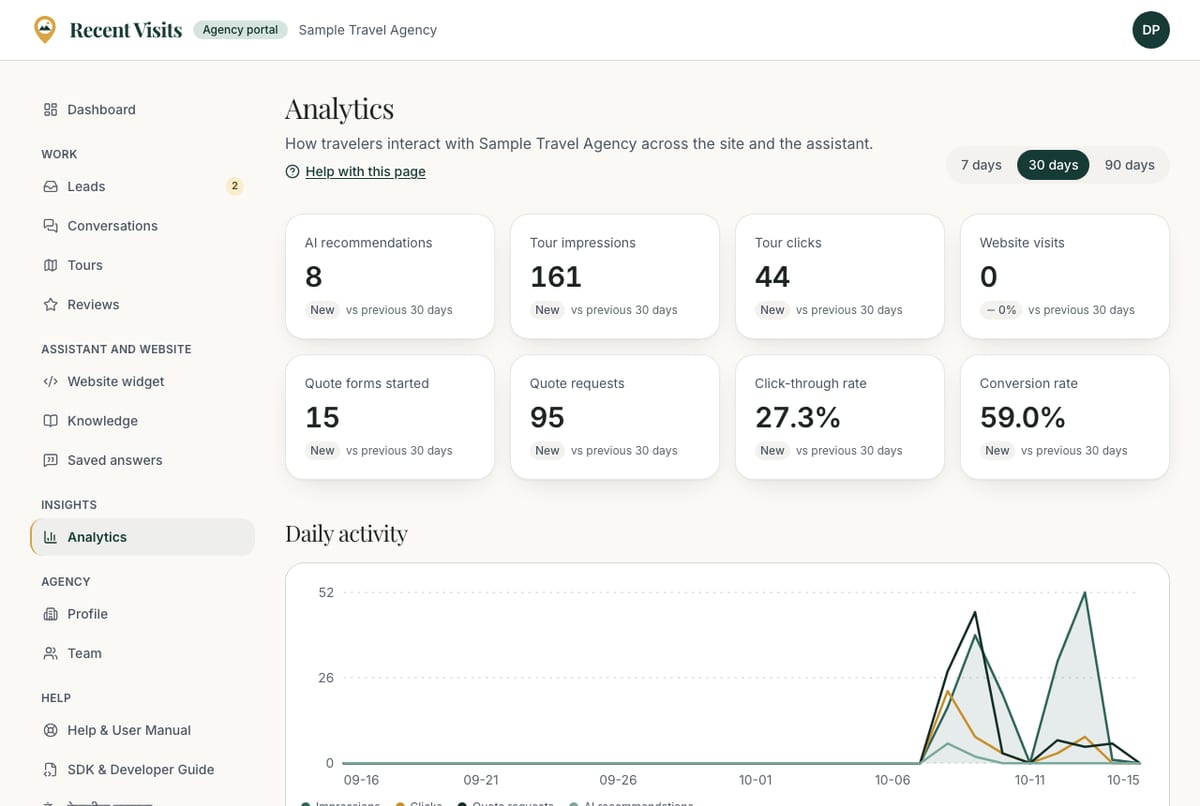
| Card | What it counts |
|---|---|
| AI recommendations | How often the AI assistant's tour matching picked your tours for a traveller. |
| Tour impressions | Times a card for your tour was shown to a visitor who allowed analytics (including cards marked Featured, if you have a boost). |
| Tour clicks | Clicks on your tours. |
| Website visits | Clicks from Recent Visits to your own website. |
| Quote forms started | Times a visitor first interacted with a quote form for your agency or tours, whether or not they sent it. |
| Quote requests | Requests actually sent to you. |
| Click-through rate | Clicks divided by impressions, never shown above 100%. |
| Conversion rate | Quote requests divided by impressions, never shown above 100%. |
The dashboard's Quote requests and Median first reply cards come from your Leads list rather than these events, and Median first reply is the middle time your team took to send a first quote or message.
Daily activity#
A line chart of Impressions, Clicks, Quote requests and AI recommendations per day. With no activity in the range: "No activity in this range. Impressions are recorded when travelers who allowed analytics see your tours."
By tour#
A table with one row per tour of your agency (any status), in the order of your Tours list. Choose a tour name to open it.
| Column | Meaning |
|---|---|
| Tour | The tour title (link). |
| AI recs | Times the assistant picked this tour. |
| Impressions | Card views. |
| Clicks | Clicks on this tour. |
| Website | Clicks to your own website from this tour. |
| Quote requests | Requests about this tour. |
A note under the table repeats that visitors who decline analytics are not counted in impressions and page views, but their clicks and quote requests are.
What it does not show#
There is no booking or revenue data: Recent Visits does not take bookings. There is no data export. Plans listed on the List your agency page mention analytics levels, but the portal does not currently gate analytics by plan: see Plans and fees.
Using the numbers#
- Few impressions: your tours may not fit what travellers search for, or you have too few published tours.
- Impressions but few clicks: improve the title, summary and feature photo.
- Clicks but few quote requests: check price, itinerary clarity and what is included.
- Slow first reply: respond sooner; it is shown to you and affects the traveller's experience.
How to read the page#
- Open Insights → Analytics and pick 30 days.
- Compare the cards with the previous period.
- Open the By tour table to see which tours work and which do not.
- Change a title, summary or photo, then check again after a week.
Troubleshooting#
| Symptom | Cause and fix |
|---|---|
| Everything is zero | You have no published tour, your agency is not Active, or nobody has visited in the range. Try 90 days. |
| Clicks are higher than impressions | Impressions only count visitors who allowed analytics; clicks count everyone. Rates are capped at 100%. |
| A tour is missing | The table lists tours that exist for your agency; open your Tours list to check it was not deleted. |
Last checked against the product:
Related articles
- Managing tours · Create, edit, photograph, publish and unpublish tours: every field of the tour form and the Tours list, photo rules, what each status means and what staff can do after a tour is live.
- Quote requests and leads · How travellers' quote requests reach you, every control on the Leads list and the request page, how to send a quote and messages, what each status means and when you see the traveller's email and phone number.
- The agency dashboard · A tour of the agency portal dashboard: the setup checklist, the Needs attention list, key figures, the funnel, the daily chart and the Top tours table, with what every item means and where it takes you.
Still stuck? Contact us and tell us what you tried.