On this page
You can browse Recent Visits, search, use the AI assistant a couple of times and send quote requests without signing up first. When you send a quote request, a free account is created from your email and we send you a sign-in link; open it to read the agencies' replies (agency replies are not emailed to an address that has not signed in). An account lets you keep your trips and conversations, read your quotes, write stories and reviews, and save stories.
| You can do this | Without an account | With an account |
|---|---|---|
| Browse destinations, treks, tours, agencies | Yes | Yes |
| Use the AI assistant | 2 written replies, then a prompt to sign up | A higher daily limit; conversations are kept |
| Send a quote request | Yes | Yes |
| Read and answer quotes at My trips | No | Yes |
| Write a story, a review, save or mark a story "Helpful" | No | Yes |
| Report a story or a review | Yes | Yes |
Who can use which page#
| Page | Route | Who |
|---|---|---|
| Create account | /signup | Anyone not signed in (signed-in people are sent on to their account or the page they came from) |
| Sign in | /login | Anyone not signed in |
| Forgot password | /forgot-password | Anyone |
| Choose a new password | /reset-password | Someone who opened a reset link |
| My trips | /account | Signed-in people (others are sent to sign in first) |
| Author profile | /account/profile | Signed-in people |
| Delete my account | /account/delete | Signed-in people; see Delete your account |
Create an account#
- Choose Sign in, then Create an account (or go to
/signup). - Fill in the form below and choose Create account.
- If email confirmation is on, a panel says "We sent a link to confirm your email". Open the link, or type the 6-digit code from the same email, then sign in.
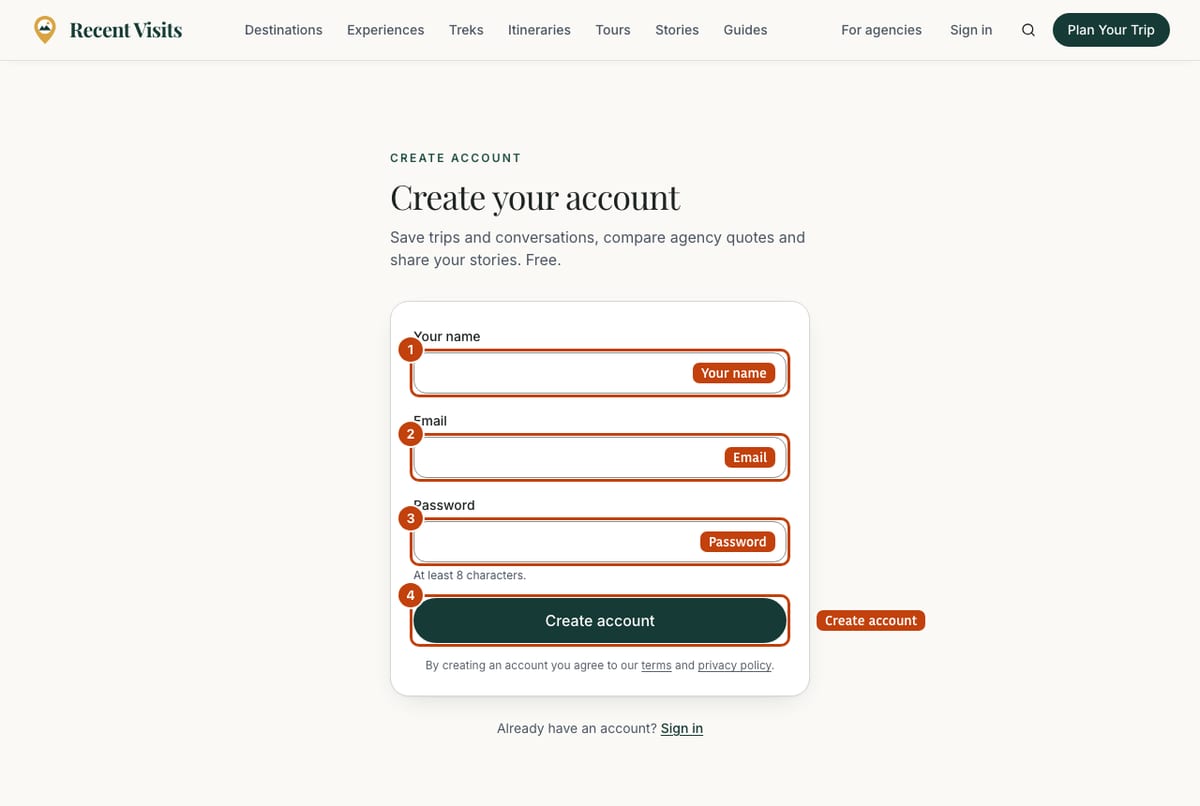
| Field or item | Type | Required? | Explanation | How to use it |
|---|---|---|---|---|
| Continue with Google | Button | No | Shown above the form only where the site has switched Google sign-in on. It signs you in, or creates the account. | Select it instead of filling in the form. |
| Your name | Text | Yes | 2 to 80 characters. Error: "Tell us what to call you". This is also the name used on your stories and reviews until you change your author profile. | Type your first name or a name you are happy to show. |
| Yes | Your sign-in address. Error: "Enter a valid email address". When you arrive from an agency invitation the address is filled in and locked ("The invitation only works for this address."). | Type an address you can open. | ||
| Password | Password | Yes | 8 to 72 characters; hint "At least 8 characters." Errors: "Use at least 8 characters", "Use at most 72 characters". | Choose a password you do not use elsewhere. |
| Create account | Button | - | Creates the account. By creating an account you agree to the terms and the privacy policy (both linked under the button). | Select once. |
| Page heading | Read-only | - | "Create your account" normally; it changes when you come from an agency invitation, a claim, an application or the assistant, so you know where you will land afterwards. | Read. |
Messages#
| Message | What to do |
|---|---|
| "Check the form and try again." | A field has a problem; read the text under it. |
| "An account with this email already exists. Sign in instead." | Use the sign-in page. |
| "We could not create your account. Try another email or sign in." | Check the address or sign in. |
| "Check your inbox to confirm your email, then sign in." | The site needs email confirmation first; see the panel below. |
Sign in#
Go to /login. If you are already signed in the page forwards you on.
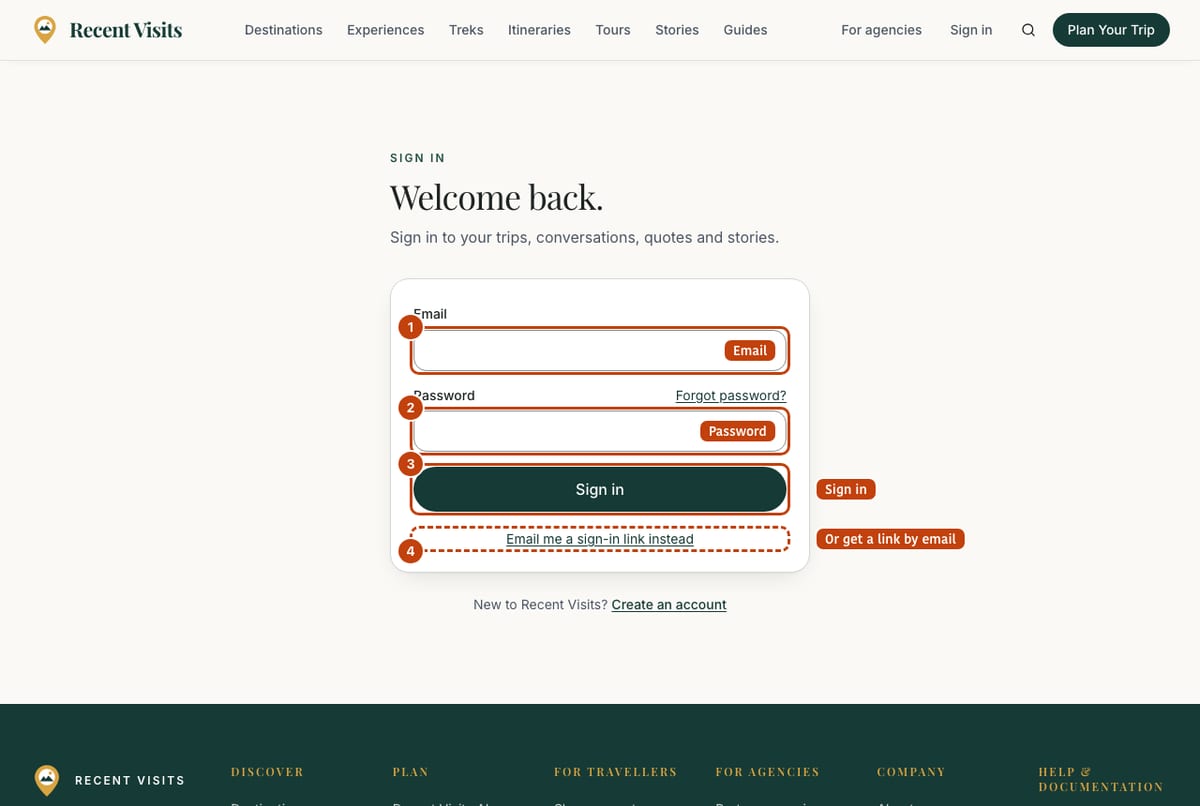
| Field or item | Type | Required? | Explanation | How to use it |
|---|---|---|---|---|
| Continue with Google | Button | No | Only where Google sign-in is switched on. | Select it. |
| Yes | The address of your account. | Type it. | ||
| Password | Password | Yes | At least 8 characters. | Type it. |
| Forgot password? | Link | No | Opens the reset page, keeping where you were going. | Select it if you cannot remember. |
| Sign in | Button | - | Signs you in. A wrong email or password shows "Email or password is incorrect." (the same message for both, on purpose). | Select it. |
| Email me a sign-in link instead | Link button | No | Switches to a form with only an email box and the button Email me a sign-in link. It also creates an account for a new address. | Use it if you have no password. |
| Use my password instead | Link button | No | Switches back to the password form. | Select it. |
| Create an account | Link | No | "New to Recent Visits?" opens the create-account page. | Select it. |
After you sign in you go to the page you were trying to reach; if there was none, to My trips (agency team members go to their partner dashboard).
Messages shown above the sign-in form#
| Message | Meaning |
|---|---|
| "That sign-in link has expired or was already used. Request a new one below." | Links work once and expire after one hour. |
| "That link was opened in a different browser than the one that requested it. Open it on the same device, or request a new link here." | Use the 6-digit code from the email instead, which works anywhere. |
| "That sign-in link is not valid. Request a new one below." | The link was damaged or incomplete. |
| "Google sign-in is not available right now. Use an email link instead." | Google could not start. |
The "check your email" panel#
After you ask for a sign-in link, a confirmation link or a reset link, a panel replaces the form. It is the same panel everywhere.
| Field or item | Type | Required? | Explanation | How to use it |
|---|---|---|---|---|
| Heading | Read-only | - | "We sent a sign-in link to (email)", "We sent a link to confirm your email to (email)" or "If an account exists for this address, we sent a password reset link to (email)". | Check the address. |
| Change it | Link button | No | "Wrong address?" returns to the form (not offered for an invited address). | Select it to fix a typo. |
| I have a code | Button | No | Reveals a 6-digit code box (placeholder 123456) and Continue. The code is in the same email and works on any device. Errors: "Enter the 6-digit code from the email.", "That code is not valid or has expired. Use the code from the latest email, or resend.", "Too many attempts. Request a new email and try again later." (10 wrong tries in 15 minutes pauses code entry for that address). | Type the six digits and select Continue. |
| Resend in 60s / Resend email | Button | No | Disabled during a 60-second countdown. Result: "Sent again. Check your inbox and spam folder." If the email service is busy: "We sent an email very recently. Please wait a minute, then try again." or "We could not send the email right now. Please try again shortly." | Wait for the countdown, then select it. |
| Didn't get it? | Expandable | No | Reminders: check spam or promotions (the sender is Recent Visits), check the address, links and codes expire after one hour. | Open it if nothing arrives. |
Forgot your password#
On the sign-in page choose Forgot password? (or go to /forgot-password). The page has one field.
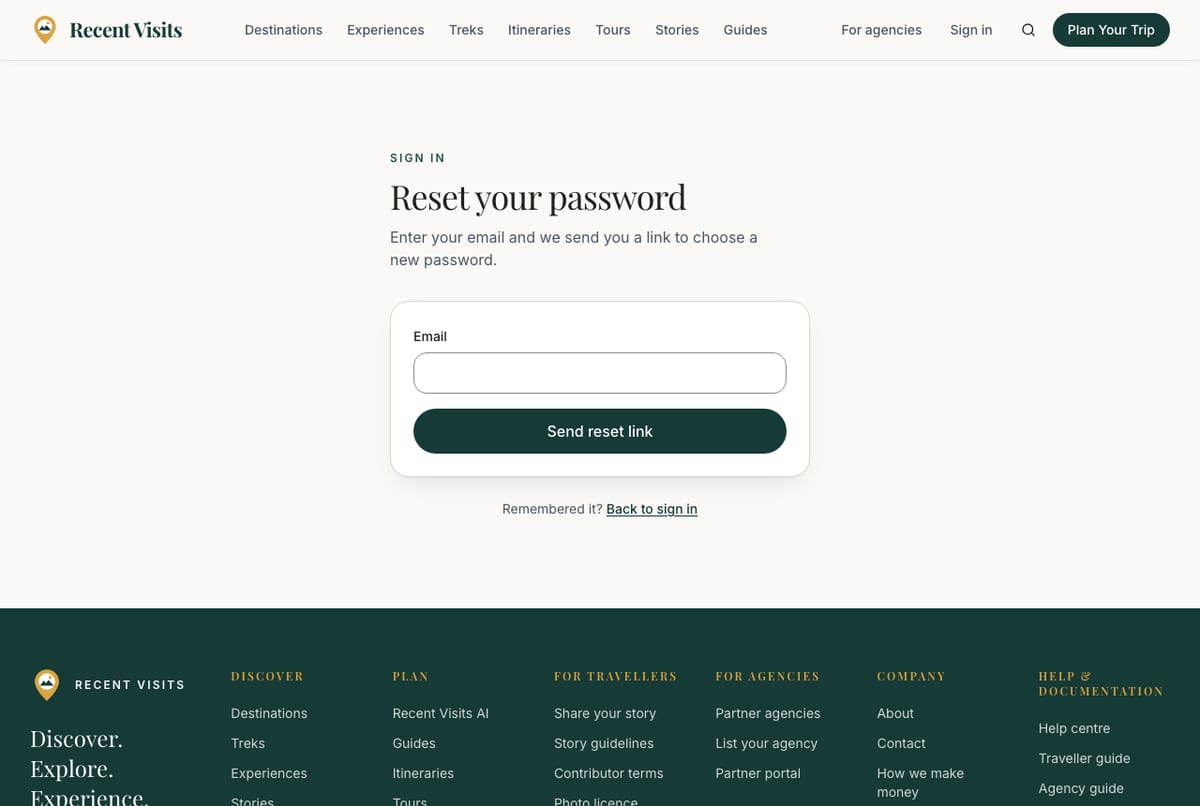
| Field or item | Type | Required? | Explanation | How to use it |
|---|---|---|---|---|
| Yes | The address of your account. Error: "Enter a valid email address." | Type it. | ||
| Send reset link | Button | - | Always answers the same way, whether or not the address has an account, so nobody can use the form to find who is registered. You then see the "check your email" panel. | Select it. |
| Back to sign in | Link | No | Returns to the sign-in page. | Select it if you remember. |
Open the link in the email (or use the 6-digit code). The page Choose a new password says "For (your email)." and has:
| Field or item | Type | Required? | Explanation | How to use it |
|---|---|---|---|---|
| New password | Password | Yes | 8 to 72 characters; hint "At least 8 characters." | Type a new password. |
| Repeat the new password | Password | Yes | Must match. Error: "The passwords do not match". | Type it again. |
| Save new password | Button | - | Saves it and takes you on to your account. Errors: "This reset link has expired. Request a new one.", "Choose a password different from your current one.", "We could not update your password. Request a new link and try again." | Select it. |
If you open this page without a reset link you see "This page needs the link from your reset email, and it may have expired." with a Request a new link link.
Your account page#
My trips (/account) shows your name (or "Traveler"), your email, a badge with your role (Traveler, Travel partner or Administrator) and a Sign out button. Agency invitations waiting for your email address appear at the top ("You're invited to manage (agency) as (role)") with a button to send the link again. If you have asked to delete your account a yellow banner says when it will happen, with a Keep my account link.
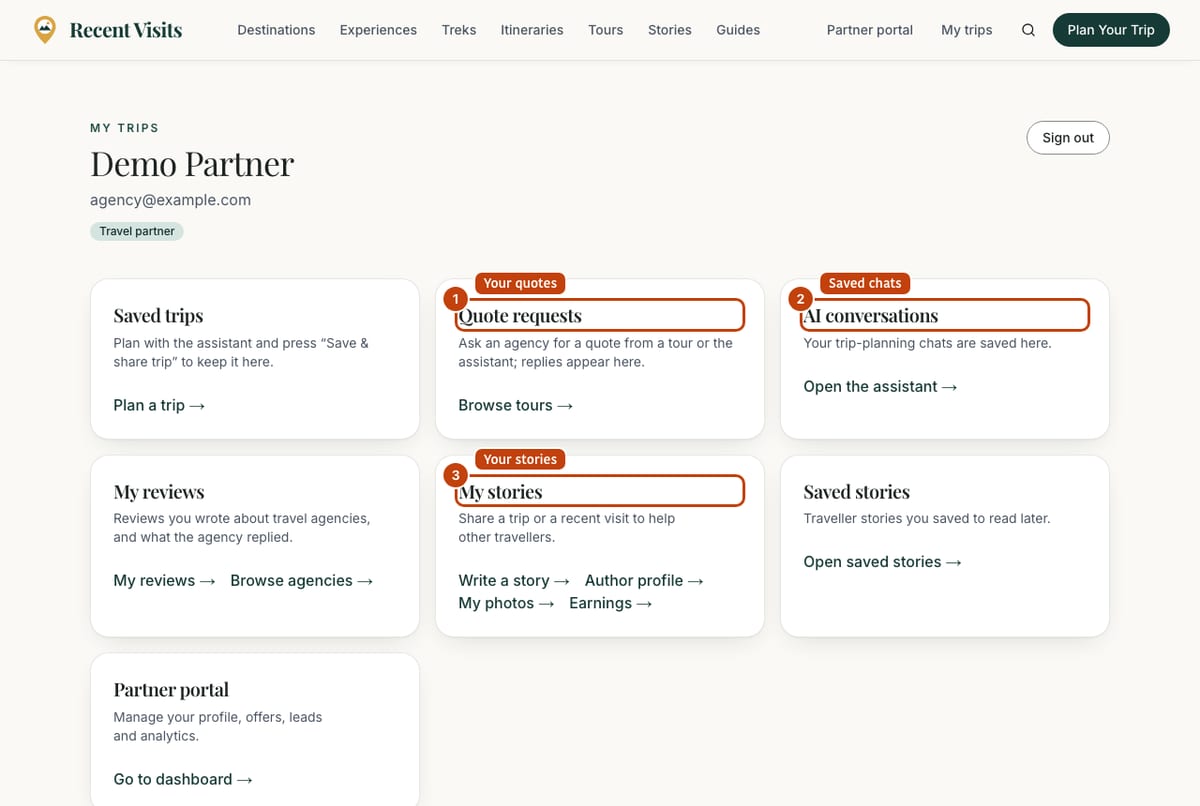
| Card | What it shows | Links |
|---|---|---|
| Saved trips | Up to eight trips you saved from the assistant, with the date. | The trip titles open the shared trip page; Plan a trip → opens the assistant. |
| Quote requests | Your 20 newest requests with the number of quotes ("waiting" when none). A request sent to several agencies appears once as Compare N agencies with how many have quoted. | Each line opens the request or the comparison; Browse tours → when empty. See Quotes. |
| AI conversations | Up to eight recent conversations (title and date) as plain text. | Open the assistant →; reopen a conversation from History inside the assistant. |
| My reviews | Reviews you wrote about travel agencies. | My reviews →, Browse agencies →. See Agencies, ratings and writing a review. |
| My stories | "N stories, M published", or an invitation to share a trip. | Write a story →, Manage stories → (only if you have stories), Author profile →, My photos →, Earnings →. See Stories, experiences and reviews. |
| Saved stories | Traveller stories you saved. | Open saved stories → |
| Agency requests | Only if you started an agency claim or application: its name and status. | Each line opens the request. |
| Partner portal | Only for agency team members. | Go to dashboard → |
At the foot of the page the link Delete my account opens the deletion page, explained in Delete your account.
Author profile#
Under My stories choose Author profile (/account/profile), or you are sent there when you try to submit a story without one. This is what readers see on your stories. Below the heading, once you have a handle, a line shows Your page: /travellers/(handle).
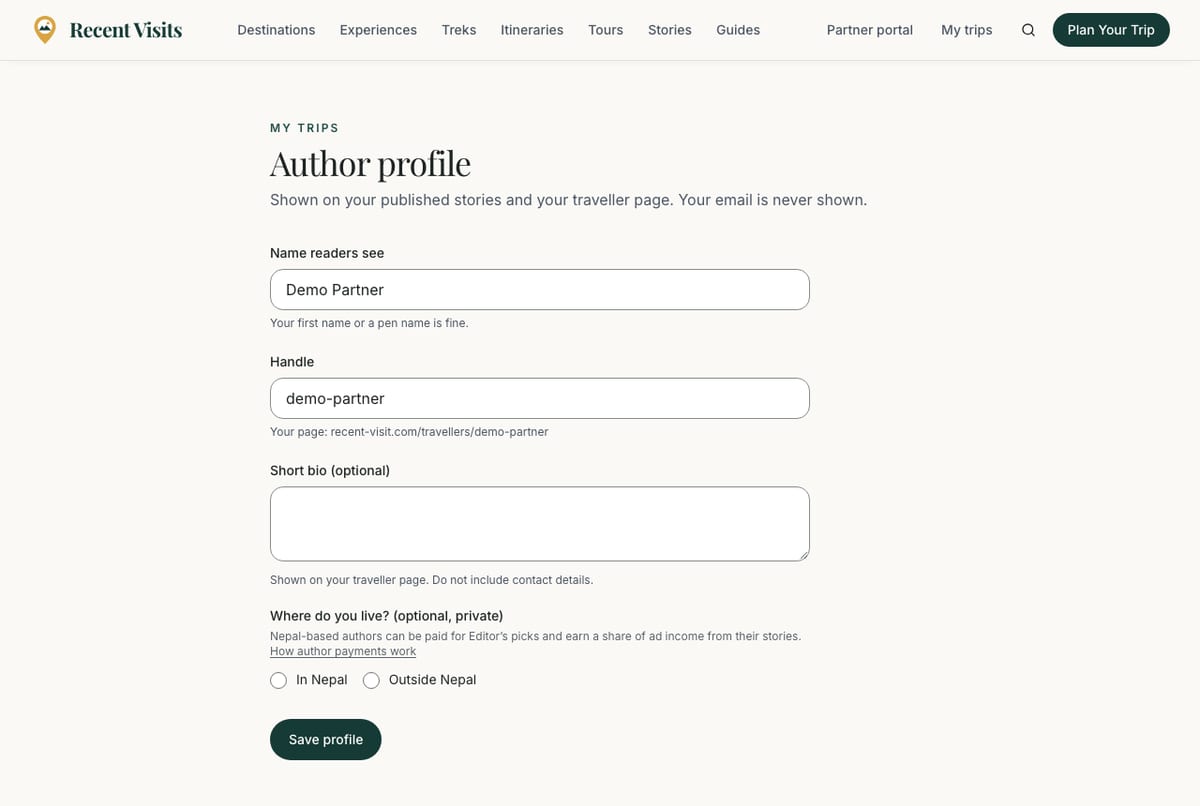
| Field or item | Type | Required? | Explanation | How to use it |
|---|---|---|---|---|
| Name readers see | Text | Yes | 2 to 60 characters. Hint: "Your first name or a pen name is fine." Saving it also updates your account name and the byline on your stories; a review you wrote earlier takes the new name the next time you edit it. | Type the name you want shown. |
| Handle | Text | Yes | 3 to 30 letters, numbers or hyphens; spaces turn into hyphens as you type, and it fills itself in from your name until you edit it. The hint shows "Your page: recent-visit.com/travellers/(handle)". Errors: "Use 3–30 letters or numbers; spaces become hyphens", "That handle is taken. Try another one." | Pick something short you can keep. |
| Short bio (optional) | Text area | No | Up to 300 characters. Hint: "Shown on your traveller page. Do not include contact details." | Write a line or two, or leave empty. |
| Where do you live? (optional, private) | Choice | No | In Nepal or Outside Nepal. Never shown publicly. It decides whether you can receive payments for stories and photos. | Choose one if you plan to earn from stories or photos. |
| Save profile | Button | - | Saves. Reads Save and return to your story when you came from the story editor and takes you back. Success: "Author profile saved." You can save 20 times a day. | Select it. |
Your public page /travellers/(handle) appears once your first story is published. Your email is never shown publicly.
Sign out and your data#
Use Sign out on the account page. To delete your account see Delete your account and privacy basics: it explains who can ask, the 14-day wait and what is kept. There is no self-service data export yet: email privacy@recent-visit.com (opens in a new tab) from the address you signed up with and we complete the request within 30 days. See the privacy policy.
Cookies and analytics#
The first time you visit, a banner asks whether to allow first-party analytics (no third-party trackers; only a random session id is stored). Choose Allow analytics or No thanks. Your choice is stored in your browser. Signing in uses necessary cookies from our authentication provider.
Troubleshooting#
| Problem | What to try |
|---|---|
| "Email or password is incorrect." | Check for typos, or use Forgot password? or an email link. |
| Email link says it expired or was already used | Request a new one on the sign-in page. |
| "We sent an email very recently" | Wait a minute and try again. |
| I am signed in but cannot open a quote | You must be signed in as an account with the same email as the request, or the account that made it; otherwise the page shows as not found. |
| The assistant asks me to sign up | You used your free replies. Sign up and your conversation moves to your account. |
| The sign-in page sent me somewhere else | You are already signed in; the page forwards you to where you were going. |
Need more help? Contact us.
Last checked against the product:
Related articles
- Delete your account and privacy basics · How to delete your Recent Visits account, what the 14-day wait means, what is deleted and what stays, how long other data is kept, and what happens when an agency closes its listing.
- Quotes and agency enquiries · How to ask a travel agency for a quote on Recent Visits, what each form field means, what happens next, and how to read, compare, accept or decline quotes. A quote request is not a booking.
- Stories, experiences and reviews · Read traveller stories, write and publish your own with the four-step editor, add photos, offer photos to Recent Visits, track earnings, and learn how review and moderation work.
- Frequently asked questions · Short answers about booking, quotes, the AI assistant, accounts, agencies, reviews and the website widget.
Still stuck? Contact us and tell us what you tried.