On this page
Your profile is the public page travellers see at recent-visit.com/partners/<your-agency> once your agency is active. It is the Profile page of the portal (/partner/profile).
Who can open it and how#
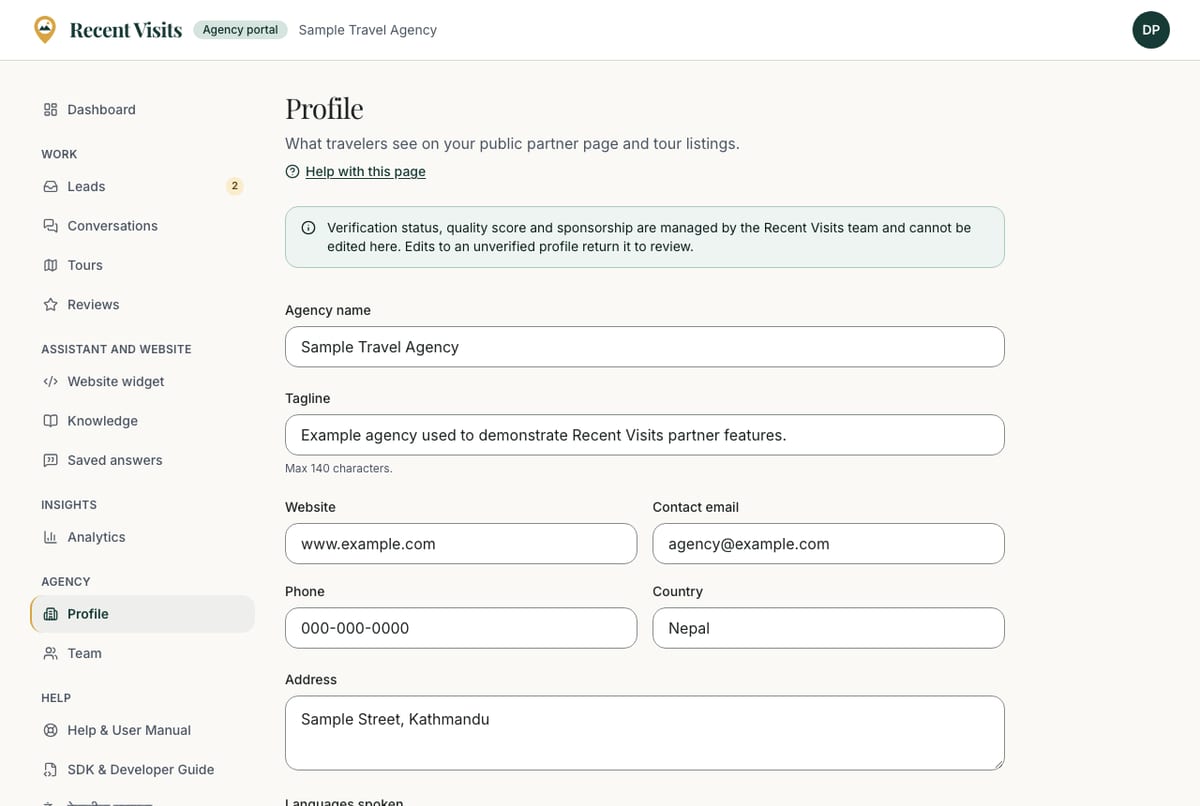
Open Agency → Profile in the sidebar. Every team member can open the page, but only agency owners see the form.
Everyone sees the blue notice at the top: "Verification status, quality score and sponsorship are managed by the Recent Visits team and cannot be edited here. Edits to an unverified profile return it to review."
What you can edit#
| Field or item | Type | Required? | Explanation | How to use it |
|---|---|---|---|---|
| Agency name | Text | Yes | 2 to 120 characters. Shown on your public page, tours and in quotes. | Your trading name. |
| Tagline | Text | No | Up to 140 characters (hint: "Max 140 characters."). | One short line that says what you do. |
| Website | URL | No | A full address, placeholder https://. Up to 500 characters. Error: "Enter a full URL starting with https://". | Your agency site. Travellers who follow it leave Recent Visits. |
| Contact email | No | A valid address, up to 254 characters. | An inbox someone reads. Emails about quote requests, reviews and tours go to this address and to every team member (demo listings: team members only). | |
| Phone | Phone | No | Up to 40 characters. | The number you answer. |
| Country | Text | No | Up to 80 characters. Defaults to "Nepal". | Leave as Nepal unless you operate from elsewhere. |
| Address | Text area | No | Up to 400 characters. | Your office address. |
| Languages spoken | Checkbox group | No | Hint: "Pick every language your team can serve travellers in." Twenty-one languages, from English and Nepali to Sherpa and Newari (Nepal Bhasa). | Tick every language you can serve. |
| About the agency | Rich-text editor | No | Hint: "Who you are, how long you have operated, what you specialise in. Shown on your public profile." Headings, lists and links; up to 20,000 characters. Error when too long: "Text is too long (max 20,000 characters)." | Write for travellers, in plain language. |
| Save profile | Button | n/a | Saves every field. The button shows a spinner while saving. Success: "Profile saved." Errors: "Check the form and try again." with a message under each wrong field. | Press it once after your changes. |
Below the form: "No longer want to be listed? Close the agency" opens Closing your agency.
What only staff control#
The following are set by Recent Visits staff and cannot be changed in the portal:
- Status (pending, active, suspended).
- Verified badge and the date it was last checked.
- Quality score, used when tours are matched to travellers.
- Paid Featured placement, if you buy it, and the Advanced review insights switch.
- Whether the listing is a Demo.
Logo, cover image and gallery#
The profile form in the portal does not include uploads for the logo, cover image, gallery or verification documents. These are managed by Recent Visits staff. The dashboard shows "Your profile is missing a logo" when one is not set, and the website widget uses your logo from the profile. To add or change your logo or images, email partners@recent-visit.com (opens in a new tab) with the file and the agency name.
What shows publicly#
Your public profile shows your name and details, a Verified partner badge (if staff set it), a Demo partner badge for demo listings, your published tours, traveller reviews and your replies, and a Contact form that sends quote requests to your portal. If nobody has joined the portal for the agency yet, the page says it is "not a partner yet" and cannot receive quote requests. Active agencies appear in the agency directory.
Profile checklist#
The dashboard's Needs attention list points out gaps: missing logo, description, contact email or phone number. A full profile helps travellers trust you. See Best practices.
How to update your profile#
- Open Agency → Profile as an owner.
- Change the fields you need.
- Choose Save profile and wait for "Profile saved."
- Open Public profile in the account menu to see how it looks (only once your agency is Active).
Expected result#
The public page shows the new details after saving. If the agency was pending, it stays in review.
Troubleshooting#
| Symptom | Cause and fix |
|---|---|
| I see no form | You are a manager. Ask an owner. See Team and account. |
| "Enter a full URL starting with https://" | Add https:// in front of your website address. |
| "Check the form and try again." | Read the message under each field and fix it; nothing is saved until all fields pass. |
| My logo is missing | Only staff can add it. Email partners@recent-visit.com (opens in a new tab). |
Last checked against the product:
Related articles
- Managing tours · Create, edit, photograph, publish and unpublish tours: every field of the tour form and the Tours list, photo rules, what each status means and what staff can do after a tour is live.
- Best practices · Practical recommendations for profiles, tours, prices, photos, replies and reviews. Recommendations are advice, not platform rules.
- Team and account · Owners and managers, how to invite, resend, correct, revoke and remove people on the Team page, what every control and delivery status means, and what the account menu offers.
- Closing your agency · How an agency owner closes the agency on Recent Visits: the Close the agency page, the CSV download of quote requests, the 14-day grace period, how to keep the agency, and what is deleted and what is kept.
Still stuck? Contact us and tell us what you tried.