On this page
Travellers can review your agency. Reviews are shown on your public profile and count towards your rating. Open Work → Reviews (/partner/reviews) to see them.
Both owners and managers can reply, confirm and report. Reviews are read-only in the portal: you cannot edit a rating, a review or its photos.
How reviews work#
- Who can review: a signed-in traveller who does not work for your agency. One review per traveller per agency. An agency must be active and have set up its account; demo listings cannot be reviewed.
- Scale: 1 to 5 whole stars; your public rating is the exact average of published reviews, to one decimal. Optional category ratings (communication, guide quality, organisation, safety, value, overall service) show once there are enough.
- Moderation: staff read every review before it appears, and decline only reviews that are fake, abusive, share private information or come from someone connected to the agency. Critical but honest reviews are published.
- Verification: a review shows Quote accepted on Recent Visits automatically when the traveller accepted one of your quotes. That shows dealings, not that the trip happened. Verified experience or Confirmed by the agency is set only by staff.
- Effect on matching: a confidence-adjusted rating from published reviews is one separately weighted input (default weight 10) in how tours are matched in the assistant, in the agency directory's "Top rated" sort and as a tie-break for itinerary matching. An agency with no reviews counts as neutral. Your plan or Featured boost never enters it.
The Reviews page#
Who can open it and how#
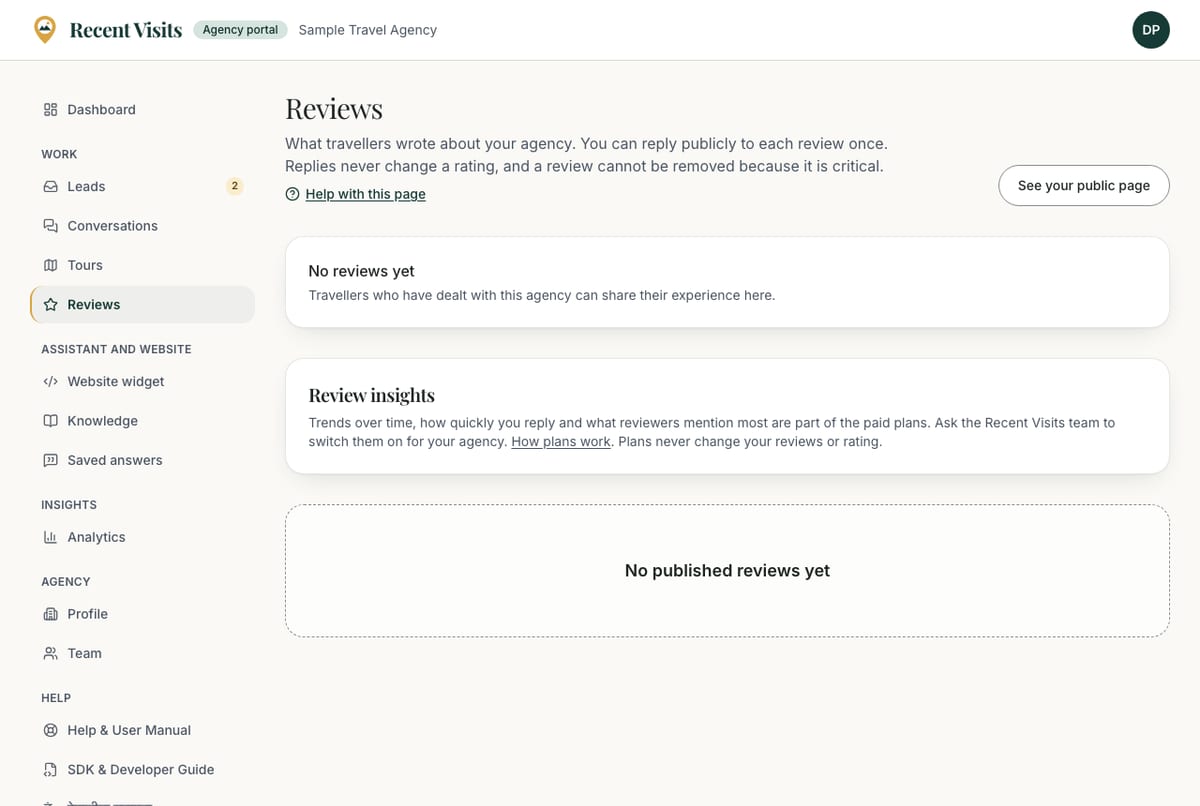
Every team member: Work → Reviews in the sidebar. The page heading has a See your public page button that opens your public page at its reviews.
Layout#
| Section | What it shows |
|---|---|
| Rating summary | The average (for example 4.6 out of 5), stars, "N reviews", "N with a verification badge", a bar for each star level and the category averages. With no reviews: "No reviews yet. Travellers who have dealt with this agency can share their experience here." |
| Review insights | A card with trends and themes, or an explanation if the feature is off (below). |
| Review cards | Eight published reviews per page, newest first. Below the list, a page selector. |
| Empty state | "No published reviews yet". |
Pending, hidden and declined reviews are not shown to you. You receive an email when a new review is published ("New N-star review of …"); it never includes the traveller's identity beyond what the review shows.
A review card#
| Item | Explanation |
|---|---|
| Stars and title | The overall rating and the title, or "N out of 5" if the traveller gave no title. |
| Author line | The author name, the month published, the type of experience (Trek, Guided tour, Custom itinerary, Cultural experience, Something else), the month travelled, and "edited" if changed. |
| "About the tour …" | A link to the tour the review mentions, if any. |
| Verification badge | For example Quote accepted on Recent Visits, with What does this mean? explaining it. |
| Review text and photos | What the traveller wrote and up to three photos. |
| Ratings by area | The category ratings the traveller gave, out of 5. |
| Response from <agency> | Your public reply, with its month. |
Under each card you see, from top to bottom:
| Control | Shown when | What it does |
|---|---|---|
| "Verification of this review is pending with our team." | Staff are already checking verification | Text only. |
| Confirm we served this traveller | The review is not yet verified and no check is pending | Tells staff you recognise the traveller. See below. |
| Reply publicly / Your public reply | Always | The reply box (below). |
| Ask us to look at this review | Always | Opens the report form (below). |
Reply publicly#
| Field or item | Type | Required? | Explanation | How to use it |
|---|---|---|---|---|
| Reply publicly (box label; Your public reply once you have replied) | Text area | Yes | 10 to 2,000 characters, at most two links. Hint: "Be polite and specific. Replies are public, appear under the review and never change the traveller’s rating." Errors: "Write at least a sentence", "Please keep it under 2000 characters", "Responses cannot contain more than two links". | Thank them, address what went wrong, offer a way to follow up. |
| Publish reply / Update reply | Button | n/a | Publishes at once ("Your reply is published.") or updates the reply; the button reads "Publishing…" meanwhile. You get one public reply per review, which you can edit. Up to 30 replies a day per person. | Press it once you are happy with the wording. |
If staff hid your reply, saving shows "Your reply to this review was hidden by our team." Replies never change a rating. Staff can hide a reply that breaks the rules.
Confirm that you served this traveller#
| Item | Type | Explanation |
|---|---|---|
| Confirm we served this traveller | Button | Sends a claim to staff, shown as "Sending…" meanwhile. It asks no questions and has no confirm dialog. Success: "Thank you. Our team will check the confirmation before the review is marked." Up to 30 a day. |
It is only a claim: staff check it before any badge changes, and it never changes the rating or the review. Only confirm travellers you really served.
Report a review#
Choose Ask us to look at this review to open the form.
| Field or item | Type | Required? | Explanation | How to use it |
|---|---|---|---|---|
| Why are you reporting it? | Drop-down | Yes | Looks fake or paid for; Written by the agency, staff or a competitor; Spam or advertising; Harassment or abuse; Shares private information; Offensive or hateful; Something else. Error: "Choose a reason." | Pick the closest reason. |
| Details (optional) | Text area | No | Up to 1,000 characters. Under it: "Disagreeing with a review is not a reason to remove it. We look for fake reviews, abuse, private information and conflicts of interest." | Say what is wrong and why. |
| Send report | Button | n/a | Sends the report to staff. Success: "Thank you. Our team will look at this review." Up to 5 reports a day per person. | Press it once. |
Reporting never hides a review by itself and disagreeing with a review is not a reason to remove it. Staff decide and may resolve or dismiss the report.
Review insights#
If staff turned on Advanced review insights for your agency, the Review insights card shows:
| Item | Explanation |
|---|---|
| Published reviews | How many reviews are public. |
| Average rating | The average out of 5. |
| Reviews you answered | The share of reviews with your reply, "N of M". |
| Median time to reply | The middle time between a review's publication and your reply. |
| Reviews per month | A 12-month chart, with the average and count per month; shown from five reviews. Otherwise: "Trends appear once you have a few more reviews." |
| What reviewers mention | Up to five themes counted from review text by keyword, each marked Praised, Concerns raised or Mixed views; shown from five reviews and three mentions. Otherwise: "Review themes appear once there are enough reviews to say something reliable." |
If the feature is off the card says it is part of the paid plans and to ask the Recent Visits team to switch it on, with a How plans work link. It is a staff-granted extra and never changes ratings or your ranking.
How to answer your reviews#
- Open Work → Reviews.
- Read the newest review and choose Reply publicly.
- Write a calm, factual reply and choose Publish reply.
- If a review looks fake or breaks the rules, choose Ask us to look at this review.
Expected result#
Your reply appears under the review on your public page straight away; the rating does not change.
Tips#
- Reply to every review, good or bad.
- Never pressure travellers to change or remove a review, and never offer anything in exchange for a review.
- Keep your profile and tours accurate so reviews match what travellers were promised.
Troubleshooting#
| Symptom | Cause and fix |
|---|---|
| A new review is missing | Staff read every review before it appears. Pending reviews are not shown to you. |
| "You are doing that too often. Please wait a moment." | You hit a daily limit on replies, reports or confirmations. |
| I cannot confirm a traveller | The review is already verified or a check is pending. |
| I cannot reply | Staff may have hidden your earlier reply, or the review is no longer published. |
See also Best practices.
Last checked against the product:
Related articles
- Best practices · Practical recommendations for profiles, tours, prices, photos, replies and reviews. Recommendations are advice, not platform rules.
- Stories, experiences and reviews · Read traveller stories, write and publish your own with the four-step editor, add photos, offer photos to Recent Visits, track earnings, and learn how review and moderation work.
- Frequently asked questions · Short answers about booking, quotes, the AI assistant, accounts, agencies, reviews and the website widget.
- Analytics · What each number on the agency dashboard and the Analytics page means and where it comes from, with the period selector, the cards, the daily chart, the By tour table and what to do with the numbers.
Still stuck? Contact us and tell us what you tried.